Showing posts with label design. Show all posts

Geeky 3D Music Video.

From one of our writers and designers, Rael del Fraile, comes this 3D video of the little big-headed robot from Star Wars, dancing like the King of Pop:


Well, now you can tell your friends that you have seen R2D2 dancing like Michael Jackson.

How to reduce Illustrator file size in PDF exports

Have you ever noticed that some Adobe Illustrator files just weigh too much? That can be a problem when uploading files for print, as several online printing sites have tight file size restrictions.

Some typical solutions for the exceeded file size problem are:

  • Removing unused layers and elements.
  • Removing the image parts hidden by cropping masks after flattening their transparency.
  • Exporting the Illustrator file in .PDF format instead of .AI format.

Using PDF format is a wise choice, as those Portable Document File formats keep the information as vectors (whenever possible.) So the PDF files will keep the high vector quality that Illustrator files already had.

But sometimes this export in PDF isn't enough to reduce the Illustrator file size under tight size requirements.

Uncheck a PDF option in Adobe Illustrator to reduce the file size

Fortunately, reducing the exported PDF file size a lot is in fact a simple, one-step solution. Just follow these easy instructions:

  • Select a High Quality print preset in Illustrator to assure that the resulting image would have enough quality for professional printing purposes.
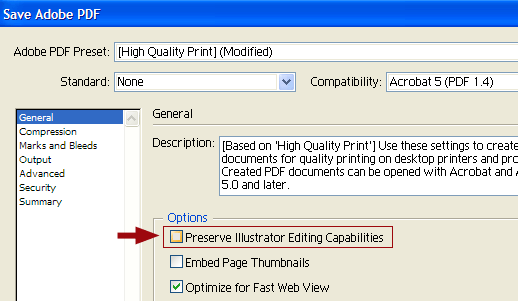
  • Then just uncheck the Preserve Illustrator Editing Capabilities option in the General PDF export menu inside Illustrator.
option to reduce Illustrator PDF size

That's all you need to achieve a dramatic size reduction of a PDF file exported from Illustrator (even containing both, vector and raster elements.)

It seems that Illustrator just keeps some of the original information in .AI format inside the exported .PDF file - that's how Illustrator assures that you would keep editing capabilities inside the exported .PDF file.

But truth is that, if you are uploading your final art file to an online printing service, those editing capabilities would be unused, and you would be much more worried by the Illustrator file size itself.

So uncheck that option, send your high-quality PDF file with the optimized file size, and don't worry about Illustrator editing capabilities in such exports!


Pure 100% CMYK black is different from rich black (HTML #000000 color code)
Rich black color

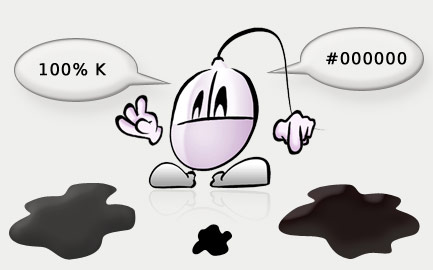
Did you know that 100% CMYK black is NOT the same as HTML #000000 color?

In most traditional CMYK print oriented programs, the default black color is the so called pure black (or solid black), composed of 0% of CMY inks, and a 100% K.

Nevertheless, if we choose the HTML #000000 black color code, we are choosing a rich black color (also called jet black, or even superblack). This rich black color is an ink combination of the following ink percents:

  • Cyan: 86%
  • Magenta: 85%
  • Yellow: 79%
  • Black: 100%

At least, these are the values of the rich black color in Adobe Illustrator. Nevertheless, these CMYK ink percents may vary for the rich black color in other programs.

Do rich black and #000000 black look like real black?

The problem with pure black (100 K) is that, when it is depicted in some RGB color space, it will look like a dark grey color.

On the other hand, the darker than black (on a computer screen) rich black color would look like a dark brown color in CMYK, as it depends a lot on the actual inks used by each printer.

In fact, this makes sense: in a CMY substractive color mixture the darker color possible would look like a dark brownish color.

On the other hand, a single black ink cannot absorb any color radiation in real world (and thus being actually pure black), so it looks like some kind of dark gray.

Finally, the misleading of the printing plates may add some color halos to a 100 K print on a colored background. This wouldn't happen using rich black instead of pure black.

What to use, 100% black in CMYK or rich black in HTML (#000000)?

Working with CMYK blacks and RGB blacks is very easy if you take into account these 2 main points:

  • Don't use CMYK rich black on a traditional CMYK print. Even with a more dense ink pattern, the result won't look as a pure clean black color in CMYK printing. You would be printing a dark brown or dirty dark grey instead of black. So printing black CMYK requires you to use only 100% Black.
  • Use the HTML #000000 color when exporting RGB images. A 100% K value would look like a dark grey in a computer screen, so you need to use rich black to see true RGB black in your monitor.

So stay clear of rich black in most traditional CMYK printing processes that use a white background. You would only need to use rich black if you try to print black text over an image or picture, to prevent trapping problems (color halos that surround the black) that would make the text hard to read.

Adobe Illustrator rich black tricks

In Adobe Illustrator there is a little trick to make your life easier. It allows you to work always with pure black (100% Black, the default black color in Illustrator color swatches), even when exporting your image to RGB: make sure that Edit > Settings > Appearance of Black is configured this way:

  • Displaying all black colors on screen as rich black. So you won't be confused with dark grey previews of your 100% K black.
  • Exporting and printing CMYK blacks as rich black. This does not change the black color (that remains as 100 K with no brownish color mixtures), but will create the #000000 HTML superblack color if exported to RGB color spaces.

We hope that this will shed some light telling the differences between pure 100% CMYK black and the rich black HTML #000000 color code!

Treble Click is a blog about useful computer tips and tricks that can boost your productivity. Treble Click aims to unveil the deep secrets of the most used software applications. Programmers, designers and just internet surfers or end users will find something useful at Treble Click. How to speed up your workflow? How to correct that annoying technical bug? You'll find your answers here.

Treble Click is also a place for designers. It's a source of inspiration where you will find useful ideas. And it's also a source of technical knowledge, that will help you to extract the maximum out of your traditional design software.

Internet is full of knowledge - but useful resources are difficult to find. Treble Click will feature only a selection of the best resources out there, analyzing why they could be worth your time.

Do you think you are a technology expert? Treble Click will explain interesting facts about computers, Internet and technology, that will keep surprising you.

Welcome to Treble Click! - going a step further in mastering Internet, computers, software and technology in general.