Error 8001050F solved in all PS3

Finally! The in-famous error 8001050F that has prevented many PS3 gamers to play during a whole day has been solved automatically. This trophy sync error that forced many modern PS3 games on the first PS3 models to quit, was a real problem that started on 1st of March 2010 but that should be fixed now, 2nd of March 2010.

Below is the original blog post


Error 8001050F PlayStation 3

Many PlayStation 3 users have recently been welcomed by the Error 8001050F when trying to connect PSN or play any game.

Surprisingly, this error 8001050F does not happen in the new PS3 Slim, but just in the big, original PlayStation 3 models.

So the error 8001050F in PlayStation 3 is probably making most Sony engineers work agains the clock, as the error is already reported in its official website as being currently fixed.

Error 8001050F at PSN and PS3 trophies, but not at PS3 Slim

This weird PS3 error has nothing to do with the overall network connectivity of the PS3 system, because it happens even when the PlayStation has a working Internet connection. Nevertheless, the error 8001050F prevents from logging in to PlayStation Network (PSN).

But the worst part of error 8001050F is that it doesn't allow to play some PS3 games which could have some kind of DRM or trophies data sync. The PS system will display a message such as "trophy load failed - reboot system". But rebooting your PlayStation 3 won't fix the problem.

Error 8001050F is not solved rebooting PS3 or restarting games

In any case, it is important to warn PlayStation 3 users that such kind of error message about a wrong trophy data load, or trophies out of sync, won't be fixed rebooting the PlayStation system. Restarting games does not fix this this error either.

So the best course of action is to keep as they are the current saved data, as well as any other configuration data stored in the PS3 till Sony finds a patch for this error 8001050F, as well as its related PSN, trophy and game related problems.

How to create CBR files

Creating .CBR files is very easy. The CBR file extension is just an image container. If we have a set of image files that we want to group in a comic or book format, we only need to:

  • Sort alphabetically the images that we want to pack iinto the CBR file. The images will be displayed in their original alphabetical order inside such CBR file. Select all the images and compress them inside a .zip file. You can do so with "right click / send to / ZIP compressed folder". Or even with "right click / add to file", depending on your file compressing utility.
  • We need to display the file extension in order to modify it. If your operative system isn't currently displaying your file extensions, in Windows XP just select the menu tools / folder options, tab display, and then uncheck the option Hide extensions for known file types, and click accept.
  • Once we have created the .ZIP file and checked the file extensions, just select that compressed file and then we click right click / change name, and then change the extension to CBR (replacing the final .ZIP by a final .CBR, and we are done.

Note: the images inside the containing CBR file need to be in the root of such path. So when compriming all our images together we need to select all the images (but not the folder containing the images) because this could generate a compressed file with a sub-folder of the same name, which could not be read by some specific CBR readers.

How to open CBR files and extract images

To open a CBR file and extract their images we only need to invert the previous process. Just right click the .CBR file and select /open with, and then select WinZip, WinRar or any other software capable of uncompressing our .cbr file (there are several compatible compression software that should handle CBR files). That will open the CBR file and show us all the images that we can extract out of such type of files.

Or, if we have the option to display all file extensions, just change it from CBR to ZIP renaming the file extension, and uncompress the CBR file like any other zipped file.

How to open CBR files in iPhone / iPod Touch.

There is an iPhone APP called MyComics, available just by 2.99€, which will allow us to open and display CBR files, as well as other file formats such as CBZ, PDF, RAR, ZIP.

And if you want to open your CBR files on the go, one of your best choices taking into account a good quality / price ratio could be an Apple iPod touch 8 GB (3rd Generation) NEWEST MODEL (affiliate link - it is a product that we tested and that we loved).


Apple iPod touch 8 GB (3rd Generation) NEWEST MODEL

Guide about how to buy a flat screen TV

As a starting point, we have to remember that it isn't possible to pick the best flat TV and the cheapest TV at the same time. The key is to find out which kind is the most important TV feature for us, and then, take into account the quality / price balance. This guide is only orientative so you won't be fooled by biased TV features and data, because while a TV can be very good at some aspects, other TV features might be lacking.

What Flat Screen TV buy?

Resolution and screen size

Let's remember that a bigger TV doesn't imply higher resolution. The resolution of a flat screen TV is the number of pixels displayed. While the screen size (in inches) is related to the TV surface where those image pixels are displayed. Having a Full-HD television does no mean that you would be watching all conents in high definition, because you also need a high resolution image source.

  • 1080p and 1080i. 1080p is the maximum TV resolution, 1920x1080, also known as Full-HD. means that you have 1080 lines of vertical screen resolution in your TV, progressive and no interlaced. Nevertheless, 1080i means that you have 1080 lines of resolution, but interlaced. At 60Hz, 1080p refreshes all the dots (pixels) on screen 60 times per second, while 1080i alternates even and odd lines in each refresh cycle, refreshing each half set of screen lines with a 30Hz rate, which can lead to the well known effect of "ghosting" or slipstream. In fact, a 1080i HDTV resolution works like a 720p.
  • 720p are 720 lines of vertical resolution, 1280x720 is HDTV.
  • HDTV stands for High Definition TeleVision, and as a concept, contains every television whose screen resolution is over NTSC resolution of 720x480 (or 720x576 for PAL TVs). So HDTV could be used with a 1080 flat screen TV, but it doesn't have to be this way. HDTV ranges from 720p to 1080i only (1080p is considered Full-HD). So we should pay special attention to the actual resolution of a flat screen TV, because the High Resolution tag could be somehow deceptive.
  • HD Ready just means "prepared for High Definition" but, as well as before with the HDTV tag, we have to pay special attention to avoid being fooled by this tag. HD Ready doesn't necessarily mean that a flat screen TV is in Full HD. A 720p TV could also be called an HD Ready TV. Nevertheless, HD Ready 1080p actually means Full HD.

TV Screen Technology: Plasma, LCD and LED

  • Plasma was the main technology used in flat screen TVs some years ago. Plasma TVs usually have vivid colors, but that does not last long, as its main drawback is that they need to be recharged after many hours of utilization, as it contains a mixture of noble gases (neon and xenon). Flat plasma TV has also the highest energy consumption, and the lowest image refresh rate.
  • LCD stands for Liquid Crystal Display. Flat screen LCD TVs are the most common nowadays. Their underlying technology allow a higher variety of sizes ranging from 15" to 100". LCD screens have a lower energy consumption than plasma TVs, have a longer lifespan, and are a cheaper technology.
  • LED means Light Emitting Diodes. Flat screen LED TVs are the latest trend. The whole screen is split into small segments that turn on and off independently. LED flat screens have the lowest energy consumption, and the highest real contrast ratios. On the other hand, it is the newest technology, which makes these TVs expensive, specially at big sizes, having only a few different models available.

Flat screen TV image parameters: contrast, response...

There are many flat screen TVs out there that seem cheap, and that also seem to have great performance in resolution and size. But you must not get fooled by just a couple of TV features. Those parameters aren't everything you need to check when you go to buy a flat screen TV. You need to check other TV features that have probably the same importance, and which could be lacking in cheap TV models.

About TV Contrast, it is necessary to distinguish 2 different kinds of contrast: Static contrast which is the real TV contrast, and Dynamic contrast which could be the difference between a white and dark gray pixels, instead of measuring a color against black, which could bias the result towards a high contrast value, but that is not an actual contrast value.

Most flat screen TVs also have contrast enhancement options called dynamic contrast, which increases the original contrast levels, losing in exchange some tonal image range, with stronger and harder color gradients, higher color saturation, and in overall, sacrificing some image quality.

Unfortunately, most data displayed when you need to pick the right flat screen TV are about dynamic contrast, because using such data the TV specifications look better, but that isn't a completely reliable information. Before buying a new flat screen TV you should search for specific technical information in detail, and for product reviews through Internet.

TV screen refresh rate. Another important feature that should be taken into account is that your flat screen TV should have a good refresh rate, also called response time or Hz, which cause seamless image transitions. With a 50Hz refresh rate a screen can convey a sensation of flickering, specially in very high screens. These are often overlooked data in the flat screen TV advertisements (except in those models that have very good values, because they take special care to highlight these data well for these TVs), as response time is usually an unknown factor by people, and so they don't recognize its real importance. A good refresh rate value is 100Hz. There are some models that feature up to 200Hz, and obviously, this good performance highly increases their price tag.

Some models include a special mode called Motion Plus / Fast Motion, which calculates when extra frames are needed. Depending on the effect level in which you configure this feature, you could either achieve an even more seamless image transition, or in too high values you could experience some image "travelling effect", like a blurred screen image feeling.

Pick the right flat screen TV according to its usage

You have to take also into account the main usage an purpose of your new TV, as that can really help you to identify the most meaningful features of your target TV.

  • If you are wanting to buy a flat screen TV to watch blu ray discs, then you really need a Full-HD TV, as it is the only way to appreciate all the details include in such high quality video.
  • Nevertheless, if you are going to use your new TV to watch regular TV, resolution is not very important, as HD TV broadcasts are just starting, and the source image is not in very high resolution - you could en up watching a blurred TV image in very big screens.
  • Finally, if you are wanting to play HD videogames take into account that most of them won't run at native 1080 lines, so an HD ready TV would suffice for most videogames. Nevertheless, the trend is to create full HD games, and that's why a Full-HD TV is your best option - even lower resolution HD games are scaled pretty nicely in Full-HD screens. Videogames have also quickly moving images, so a good refresh rate becomes specially important for this purpose.
  • According to the TV size, the rule of thumb is to pick a flat screen that is completely covered by your vision angle, which is around 30º, so you would be appreciating small details while achieving an immersive TV experience. That means that a widescreen TV of 40 inches will look good at a distance of around 1.7 meters.

Other flat screen TV details

According to the color, as well as to the smooth flowing of the image (the refresh rate, Hz, previously mentioned) the best we can do is to see a TV in real life and check it by ourselves. We have to take special care to identify whether the flat TV that we are currently watching is with the dynamic contrast option enabled or not, because that could highly affect the original color.

Another fact to take into account when picking a new flat screen TV is that most TV shops feature their products under strong lights. That's why the usually pick the higher contrast settings in all the exhibited TV screens. But such high contrast would be really extreme in a normal TV environment at your house. So take that into account when buying your new TV, as you could not be needing such high amounts of contrast ratio, and even those flat TV screens that seemed somehow dull under strong lights could look great at your home. Usually color accuracy is a more important factor than just color contrast.

Flat TV screens have what is called a vision angle. That means that the screen is not seen the same way straight from the front or a little bit from its side, so it is another fact worth checking. As well as the type of screen, gloss or matt (non reflective) finish. At first sight, and specially at a shopping center, the glossy TV screen could look more vivid, specially if the flat TV is displaying very colorful images in its screen. But watch out, as this supposed image improvement doesn't need to be necessarily real. It is worth taking into account when buying a new flat screen TV that glossy finish could also reflect objects and light sources, specially when displaying dark images or black areas.

All the information in this guide is focused in flat screen TV features, given as technical data. But according to the underlying technology of the TV (plasma, LCD or LED) and its specific manufacturing, it could display the final images better or worse. So at the end, our best suggestion is to check the TV with your very own eyes. From trebleclick.blogspot.com we only expect to assist you about how to buy a flat screen TV checking which kind of TVs should be taken into account, what does each TV feature mean and how to prevent being fooled by deceptive TV specifications.

From the original guide to buy an HD TV at Triple Clic
The right flat screen TV

Some examples of good flat screen TVs to buy

Samsung LN32B360 32-Inch 720p LCD HDTV is probably one of most competitive TV options, specially taking into account its cheap price tag. It isn't full HD, and 8ms of response time might be rather slow, but nevertheless, you are getting a 32 inches flat screen TV with great colors with a low cost - perfect for watching regular TV and even HDTV programs (thanks to its built-in HD digital tuner) without eating all the empty space of your home.

Samsung LN40B530 40-Inch 1080p LCD HDTV goes a step beyond than the previous model. With its 40 inches flat screen and an improved response time of 6ms, this TV delivers rich colors, big images and quick response. So this is a very good choice for watching full-HD blu ray discs and playing videogames, still with a very competitive price tag.

Finally, if you buy a Samsung LN52B750 52-Inch 1080p 240 Hz LCD HDTV, you will be getting it all. It is an expensive TV, but if you can afford it, you will realize that it is worth it. With a huge screen of 52 inches, a quick response time of 5ms, a dynamic contrast of 150,000:1, and a refresh rate of 250 Hz, this TV is perfect for just everything.

iPad, the new product from Apple

trebleclick.blogspot.com reports:

Apples latest product was a "secret" known by everybody. The Net will be flooded with detailed information, but our objective is very different. So, to summarize, we are providing you the most relevant Apple iPad facts:

  • iPad is a mini-netbook Table with a multi-tactile LED screen of 9.7 inches, a screen resolution of 1024x768. Depending on the model, you can also use WiFi and 3G connections, with capabilities of 16, 32 and 64 Gb. iPad price ranges between 500$ and 700$.
  • The surface of the iPad measures 24 x 18 cm, and has a width of 1.34 cms. (that's 9.45 x 7.09 x 0.53 inches). It weighs around 680 gr. (WiFi version) and 730 gr (3G version), with a non-removable internal battery with a duration of 10h of video and WiFi usage.
  • Inside the iPad is an Apple A4 processor of 1 GHz, whose microprocessor integrates a graphic processor with video support up to 720p at 30fps in H.264.
  • iPad runs on the same operative system than the iPhone, and the old iPhone apps will be adapted for iPad with no additional cost for the users who already purchased such aps at the Apple store.
  • A single USB port, a headphones output of 3.5 mm, accelerometer, light sensor, WiFi N, Bluetooth 2.1 + EDR and 3G (depending on the model), A-GPS, compass.

Summarizing, the fact is that iPad has the same usages of an iPhone or an iPod, in big, with the advantages and limitations that this implies.


iPad de Apple

Via: Applesfera.com

Haloscan comments closes at 10th February 2010

The blog comments service haloscan.com, closes the next 10th of February 2010.

According to Haloscan sources, a physical failure of its system forces them to close their commenting service. They provide 2 different alternatives:

  • Exporting your existing blog comments, so you can import them in a different commenting service.
  • Migrating your account to Echo, a different comments system which is not free, probably owned by Haloscan.

According to this second Haloscan migration option, they seem no to have no physical system failure that forces them to cut off the service. It all seems to be a rude justification to discontinue their current commenting service and then charge for the same service. Of course they have the right to do so, but their commenting service was somehow limited, with even less features than other free blog commenting services.

These kind of practices betray in some way user's confidence. They decided to start at some point with a free blog commenting system (well, not completely free, let's remind that you accepted such service in exchange to including advertisements in your own blog comments window), and in the long term they have to face this closing situation. Let's see whether an important drop in their number of users teaches them a lesson.

If you are a user of haloscan.com and you want to keep your previous blog comments, we suggest you to backup such comments before the closing deadline.

What are Google Analytics notes?

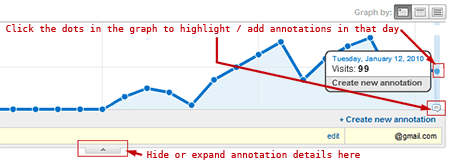
Google Analytics has a new feature that allows you to create notes for your statistics. With Google Analytics notes you can attach a description or a comment to any date in your graph. It is just a matter of clicking a point in your graph, and then, writing down your annotations.

Why are Google Analytics notes so important?

This feature is very interesting because, till now, you had to keep a changelog for any maintained sites. But by embedding notes straight from Google Analytics, attached to specific dates, you can keep your historic of changes together with your statistics.

In a nutshell: with Google Analytics notes you better understand how is your site behaving. And only by understanding your measures you could optimize your site.

Adding notes in Google Analytics

The best 5 ways to use Google Analytics notes

Since you can write your annotations in Google analytics to understand perfectly how it works (and being thus able to improve it), now the key is writing only those notes that are really meaningful.

For me, these are the 5 best ways to write notes in Google Analytics:

  • Write notes with brief descriptions of your major site changes. That is, adding lots of new content, changing the website design, modifying the site navigation, and so on. After all, website analytics were designed to measure scientifically how human users and search engines navigate your site, so you have to pay special attention to strong changes in your statistics from that "major site changes" mark.
  • Write a comment when any part of your homepage changes. Most returning users don't bookmark inner pages in your site: they just type the address of its homepage. And, of course, most new users are guided straight to your homepage. On top of that, your homepage is usually the main page rank distributor to the rest of your site. So any subtle change on your homepage could deeply impact both your users and search engines. And that's why you should pay attention after the "homepage changed" note in Google Analytics.
  • Add a new note when any promotional campaign starts. When you put any special effort in a promotional campaign (either AdSense PPC, e-mailing, link building, and so on), you have to measure its impact. Is your campaign worth your time and effort? Does it attract new traffic? Now, you just have to look at your Analytics after the "promotional campaign started" annotation.
  • Add annotations to your Analytics whenever you publish a new article, blog post or site page. If you really have the good habit of posting high quality content each day, this amount of notes could become overwhelming. Nevertheless, if you just update your contents once a week or less, it is important to measure how your content writing efforts affect your analytics. Check the "new content title" tag inside your Google Analytics graph and discover what is your best kind of content for traffic building purposes.
  • Write a note whenever you detect a traffic spike in your statistics. That is, when a lot of users suddenly access your site, you register a peak in the graphs of Google Analytics. Finding the cause of such spikes is usually very easy: just look at your traffic sources. It will mostly be caused by a link pointing to your site from a very popular site. This way, these eye-catching traffic spikes won't distract you too much when understanding the subtle meaning of your Google Analytics statistics, now being marked with the "traffic spike cause" note below. And keep an eye trying to repeat such useful spikes.

Starred notes in Google Analytics

Specially meaningful annotations can be marked with a star icon, so you can filter out such less-important notes by selecting the starred option.

My suggestion is that you should try to mark everything in your statistics using these Google Analytics notes, because that will give you lots of fine-grain information. Couple this with the new Google Analytics Intelligence feature and you will be discovering tiny details that can really influence your results.

Nevertheless, Analytics notes are a time-saver feature. If you want to perform a broader analysis than the default last month statistics glance (let's say, a one year analytics report), you won't need lots of annotations - trust the most important, starred notes to get the big picture.

Google Analytics notes are a great way to understand and at glance the results of your Internet marketing efforts. Quick statistical understanding is the key to measure and optimize. So take advantage of this new time saving feature of Google Analytics when tracking your statistics. Use it wisely, following these best 5 ways to use Google Analytics notes

From the original online marketing consulting report by E. Serrano

Backup user passwords for Windows users in USB

A little known feature in Windows is that you can creat a password recovery USB.

Creating that recovery USB is pretty easy: just log in as a Windows system administrator. In Windows control panel pick the option User accounts.

Select the Windows user for whom you want to create the USB for password recovery. Among the options of this user, in the left area, under the Related tasks area, there is an option about Preventing to forget passwords.

When clicking that password forget prevention fature, a new dialog will appear to pick a password recovery disc in an USB key. (Well, you could use even a diskette for password recovery, but it isn't worth in these times...).

By selecting that option, the recovery passwords will be stored in the root of the USB as an encrypted text file. This safe file stores Windows passwords in a safe way, and it can only be accessed in the same Windows computer in which it was created (if no other password recovery USB is created using this same method).

So this is a way to create an USB for each user, as a system to recover Windows user passwords for each user.

How to store many Windows password recovery files in the same USB

Since the password recovery file created always has the same filename (it is called userkey.psw), you will need a different USB key for each user, in each Windows computer.

To solve this and have several user passwords stored in a single backup USB, you just need to rename the password file created (for example, to user0001.psw) and so on with the next password files that we create. Remember to organize them in a meaningful way to prevent forgetting the user and Windows associated to each password backup file.

After this, to recover Windows user passwords you just need to rename the proper backup file in your USB to userkey.psw, and using the USB key with such standard filename in its root.

---

Originally written by Eugenio M.S. at tatachan.com